Verixa by Curiosbot

Catch artwork errors before they reach the press.

Verixa compares approved artwork with every new proof, character by character and pixel by pixel. Text, graphics, barcodes, Braille, spelling and approved copy are inspected in one workspace, with an audit-ready report at the end.

AI-Powered Artwork & Document Verification

Product tour

From upload to audit-ready report in under two minutes.

A silent, captioned walkthrough of a real Verixa inspection, from the approved carton and a new proof to a signed-off PDF report.

What the tour shows

  1. Upload the approved artwork and the new proof
  2. Run the inspection: results in seconds
  3. Review each finding: approve, reject or comment
  4. Graphics: overlay view of what changed
  5. Barcodes decoded and compared: an EAN-13 value changed
  6. One click: an audit-ready PDF report
  7. Brief to artwork: an approved Word copy against the final carton

All screens use fictitious sample data. The video has no audio.

What Verixa inspects

Every character, every pixel, every code.

Ten capabilities in one workspace, each shown below on a sample carton. Select any screen to open it at full size.

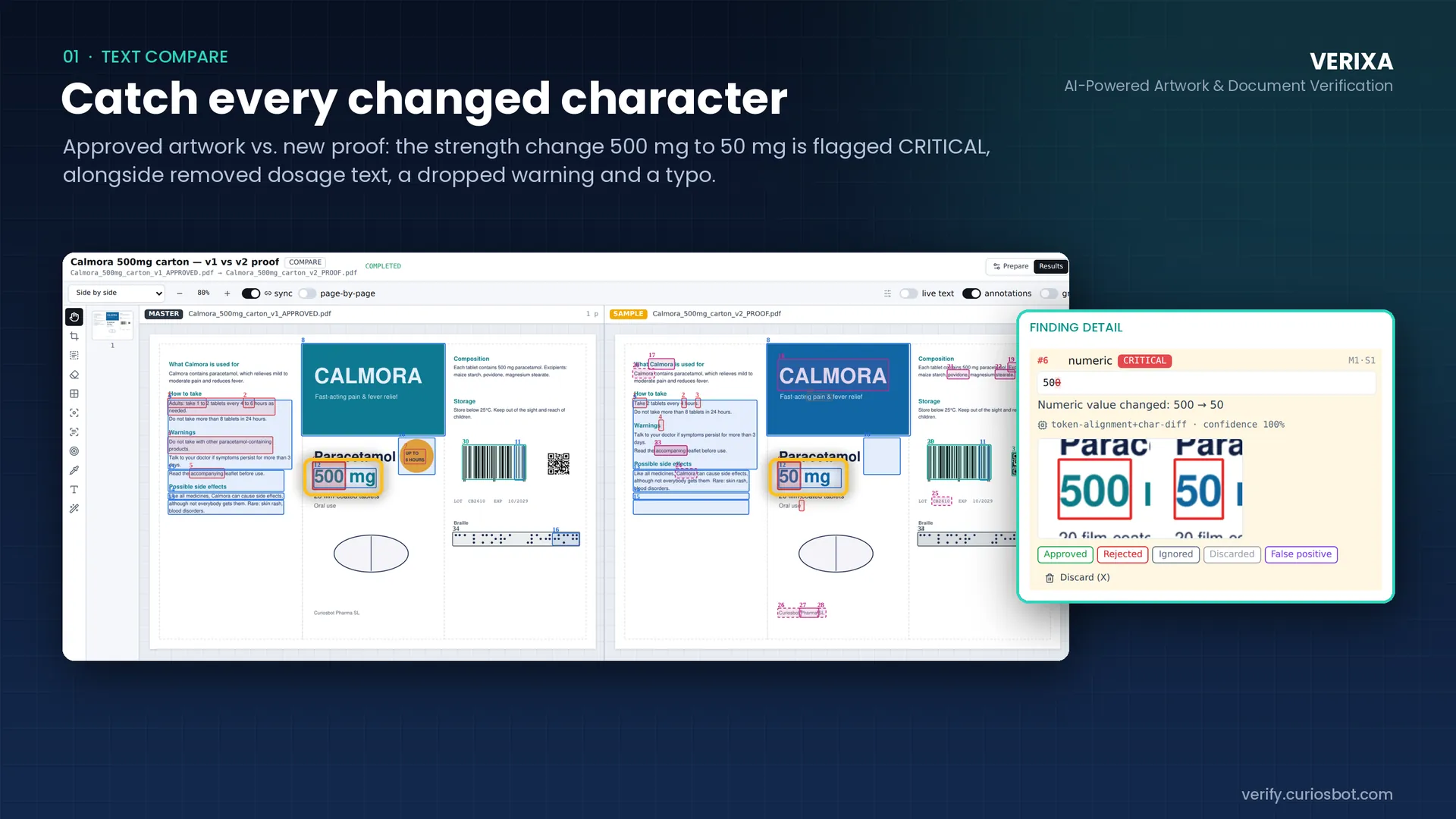
Verixa text compare: approved carton artwork beside a new proof, with the Finding detail panel showing a CRITICAL numeric change from 500 to 50. (opens the full-size screen in a new tab)

01 Text compare

Catch every changed character

Compare approved artwork with a new proof side by side. Numeric changes are treated as safety-critical: in the sample inspection, a strength change from 500 mg to 50 mg is flagged CRITICAL, next to removed dosage text, a dropped warning and a typo.

  • Synchronised side-by-side view with live text and annotations
  • Every finding carries a severity, the algorithm that produced it and a confidence value
  • Reviewers mark each finding Approved, Rejected, Ignored, Discarded or False positive
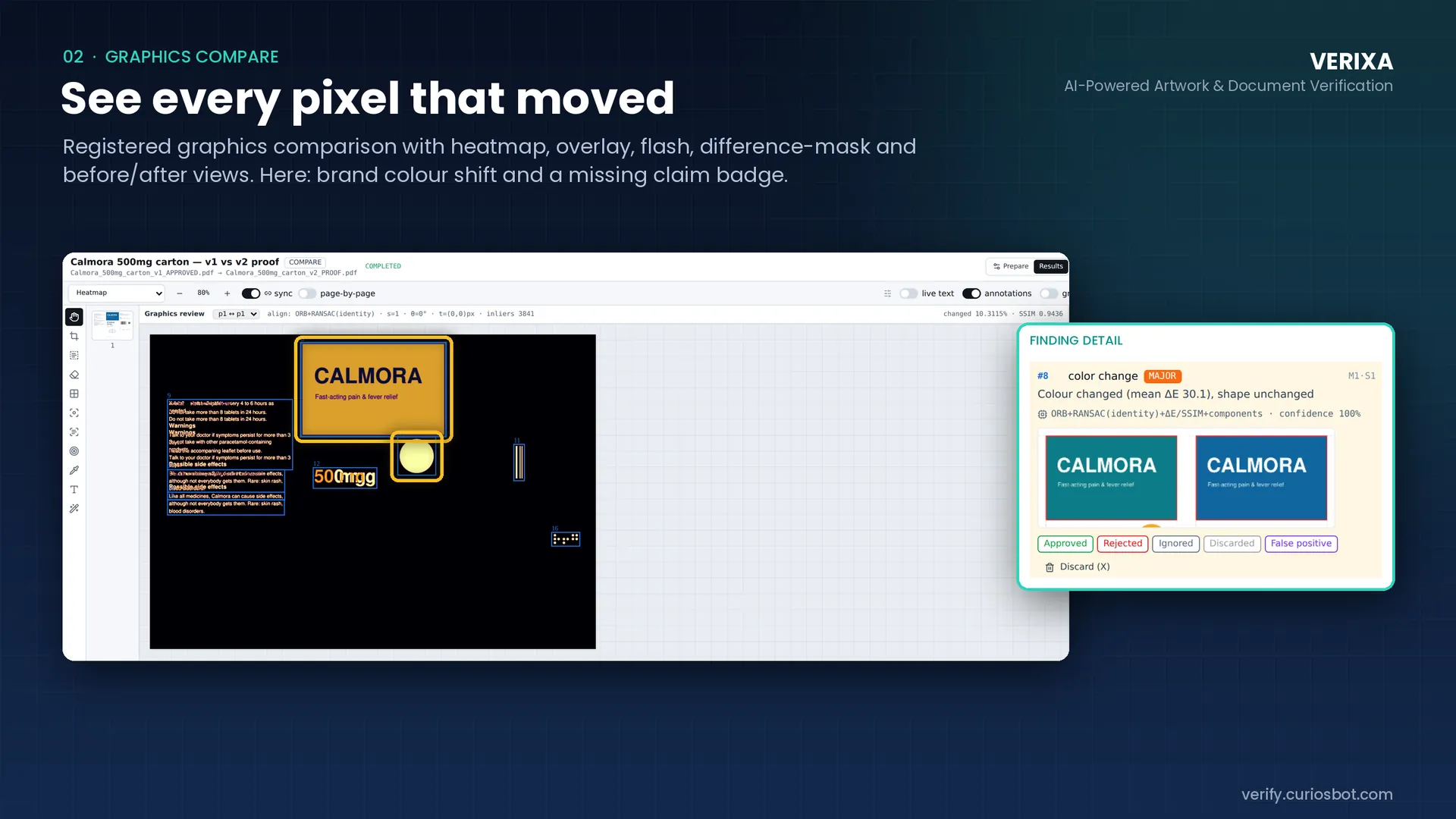
Verixa graphics compare in heatmap view, with a MAJOR colour-change finding showing the original teal against the changed blue brand panel. (opens the full-size screen in a new tab)

02 Graphics compare

See every pixel that moved

Registered graphics comparison with heatmap, overlay, flash, difference-mask and before/after views. In the sample, a brand colour shift and a missing claim badge are found and measured.

  • Automatic alignment of master and proof before comparison
  • Colour change reported as a measured difference (ΔE), with the share of changed area and a similarity score
  • Choose the view that makes each difference easiest to judge
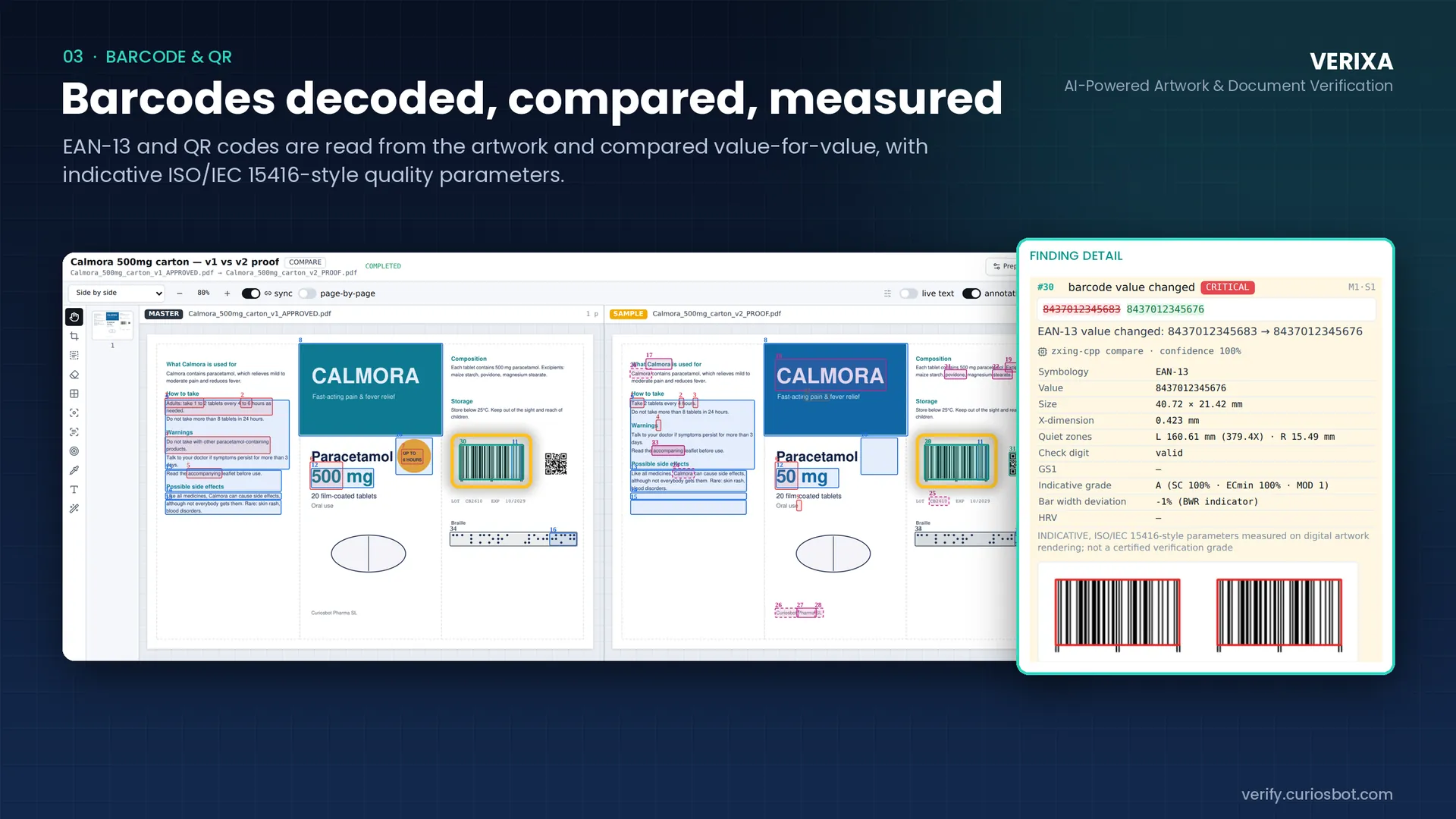
Verixa barcode finding: an EAN-13 value changed, with symbology, size, X-dimension, quiet zone, check digit and indicative grade listed. (opens the full-size screen in a new tab)

03 Barcode and QR

Barcodes decoded, compared, measured

EAN-13 and QR codes are read from the artwork and compared value for value, with indicative ISO/IEC 15416-style quality parameters alongside.

  • A changed barcode value is flagged CRITICAL, with old and new values shown together
  • Symbology, size, X-dimension, quiet zones, check digit and an indicative grade
  • Quality parameters are indicative only and are not a certified verification grade
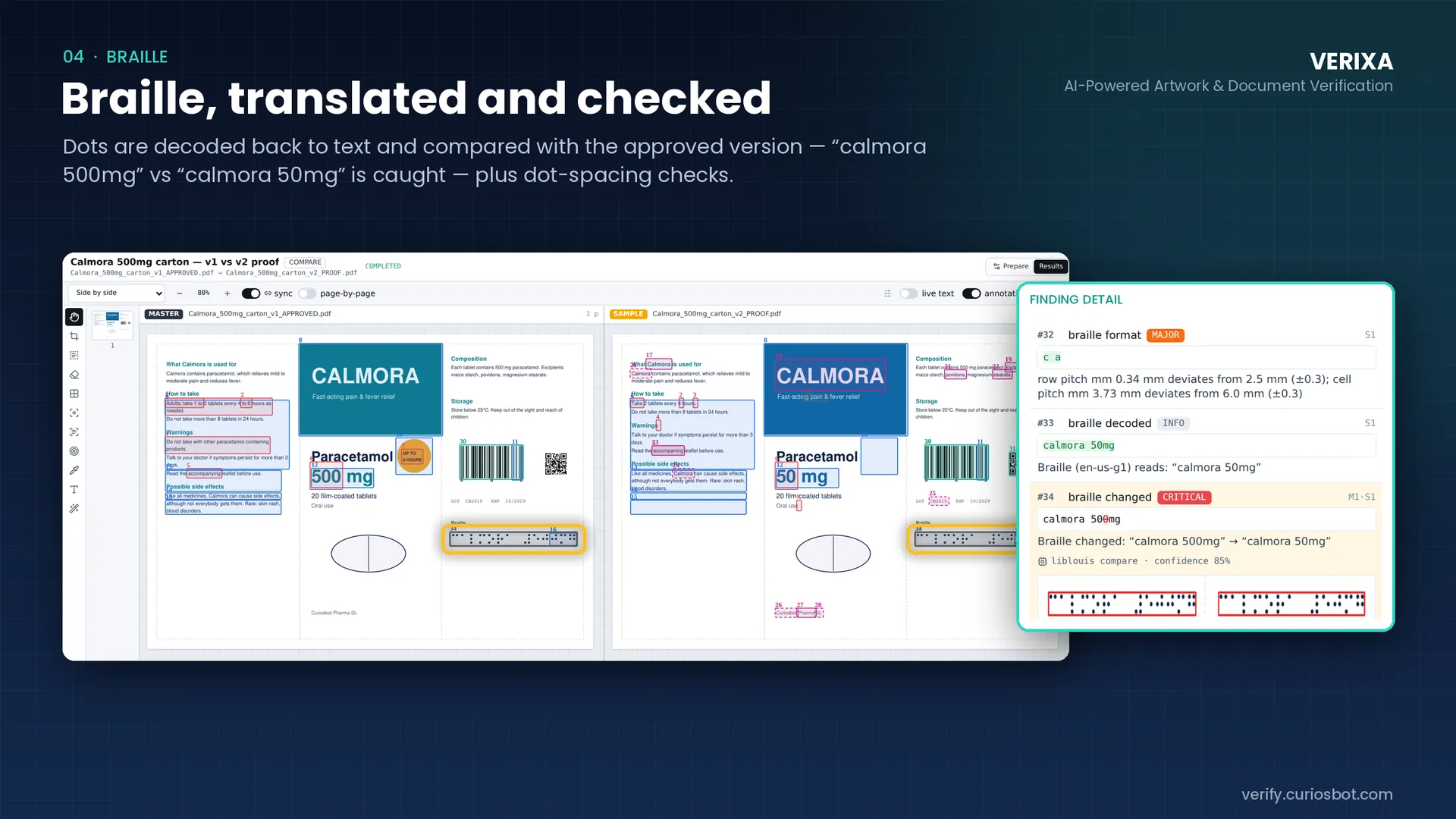
Verixa Braille findings: a format finding on dot pitch, the decoded text “calmora 50mg” and a CRITICAL Braille change. (opens the full-size screen in a new tab)

04 Braille

Braille, translated and checked

Braille dots are decoded back to text and compared with the approved version. In the sample, “calmora 500mg” against “calmora 50mg” is caught, along with dot-spacing checks.

  • Decoded text is shown so reviewers can read what the dots say
  • Row and cell pitch are measured against the specification
  • A changed Braille string is flagged CRITICAL
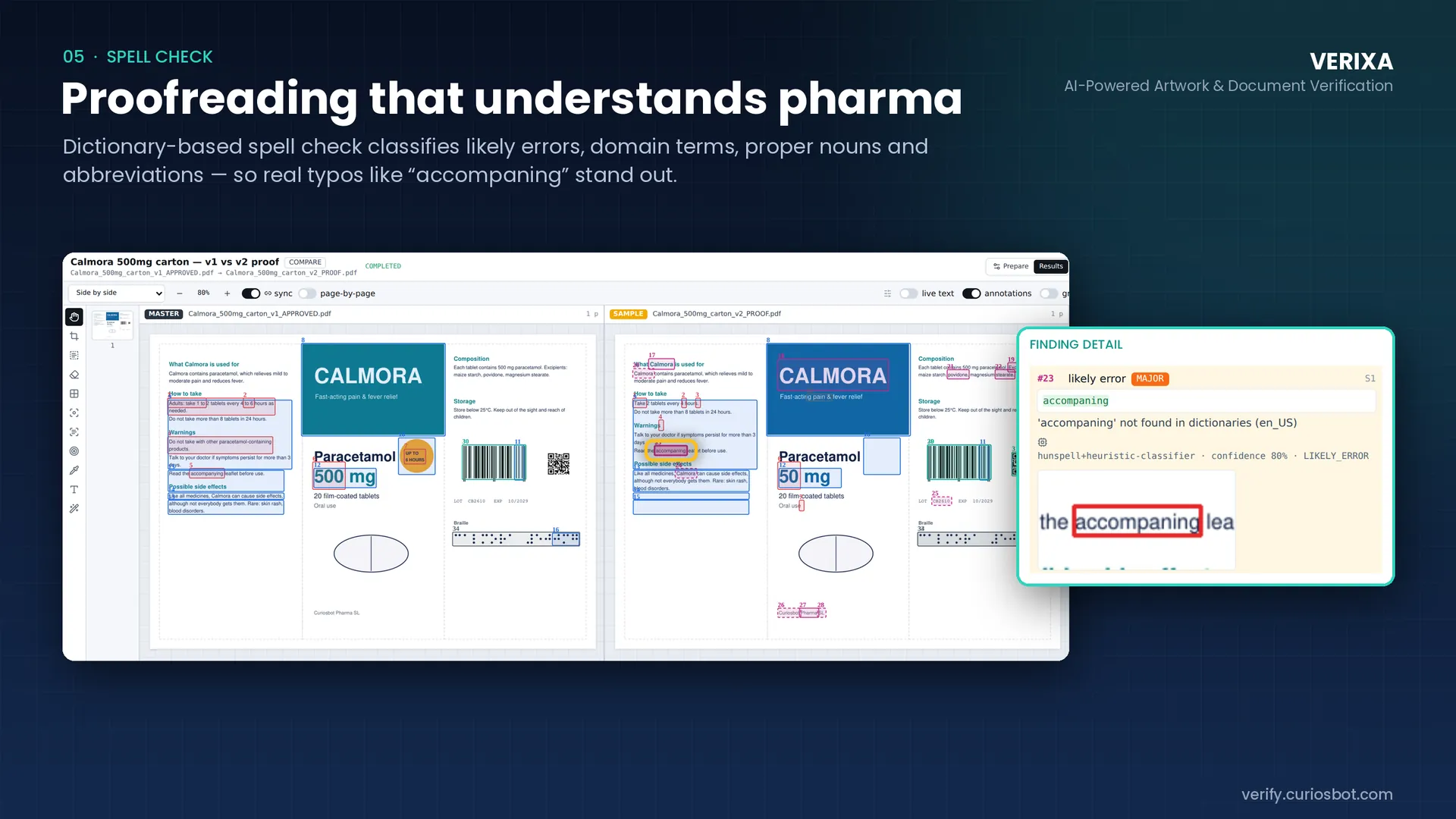
Verixa spell check: the word “accompaning” highlighted on the proof and listed as a MAJOR likely error. (opens the full-size screen in a new tab)

05 Spell check

Proofreading that understands pharma

A dictionary-based spell check classifies likely errors, domain terms, proper nouns and abbreviations, so real typos such as “accompaning” stand out from legitimate terminology.

  • Likely errors are separated from domain terms and proper nouns
  • Each finding shows the word in context on the artwork
  • Runs on a single file in Proofreader mode, no master needed
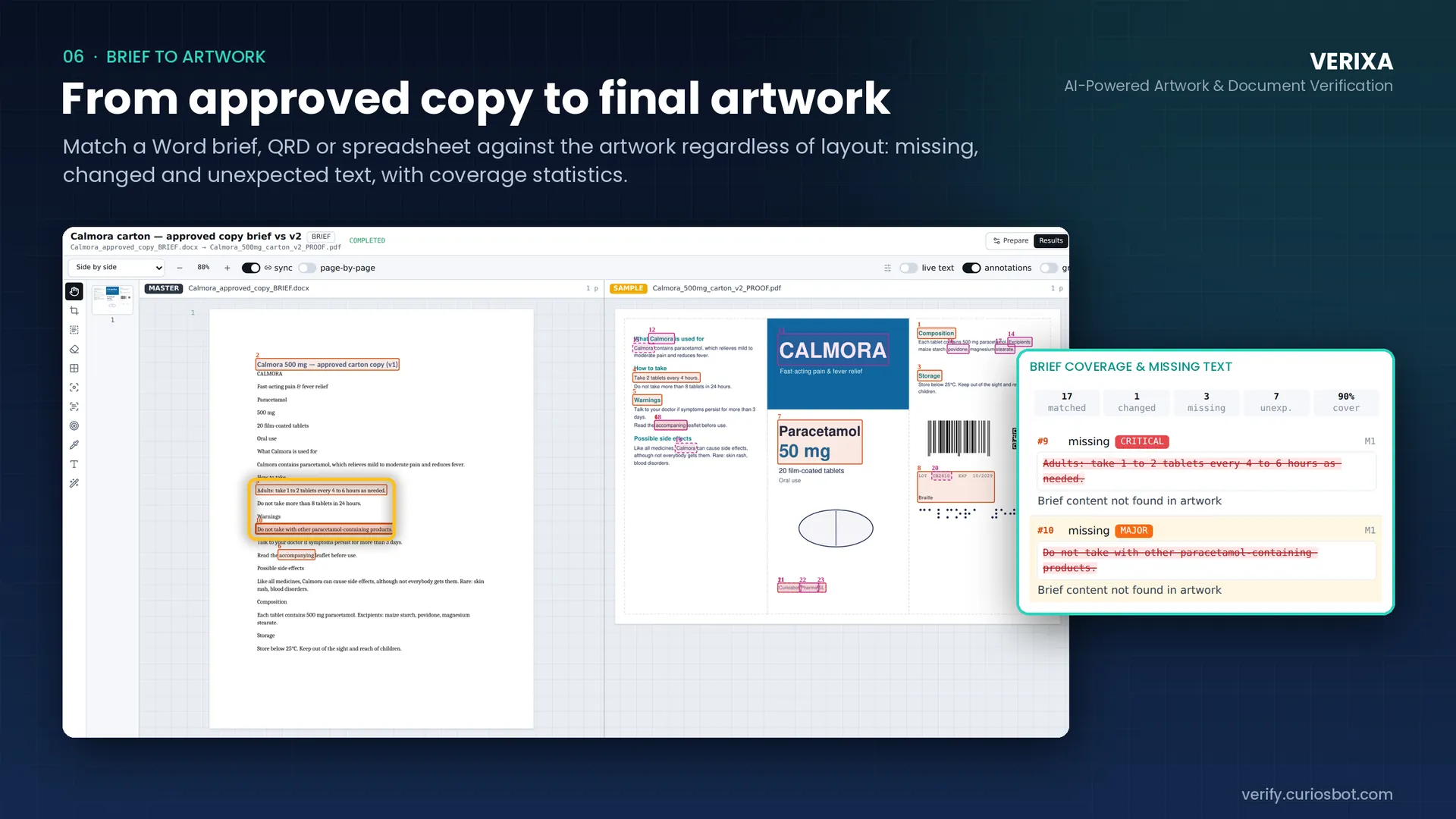
Verixa brief-to-artwork: an approved Word brief beside the carton proof, with a coverage panel showing matched, changed, missing and unexpected text. (opens the full-size screen in a new tab)

06 Brief to artwork

From approved copy to final artwork

Match a Word brief, QRD or spreadsheet against the artwork regardless of layout. Missing, changed and unexpected text is reported with coverage statistics.

  • Layout-independent matching of approved copy to artwork
  • Coverage summary: matched, changed, missing and unexpected text
  • Missing warnings are flagged by severity
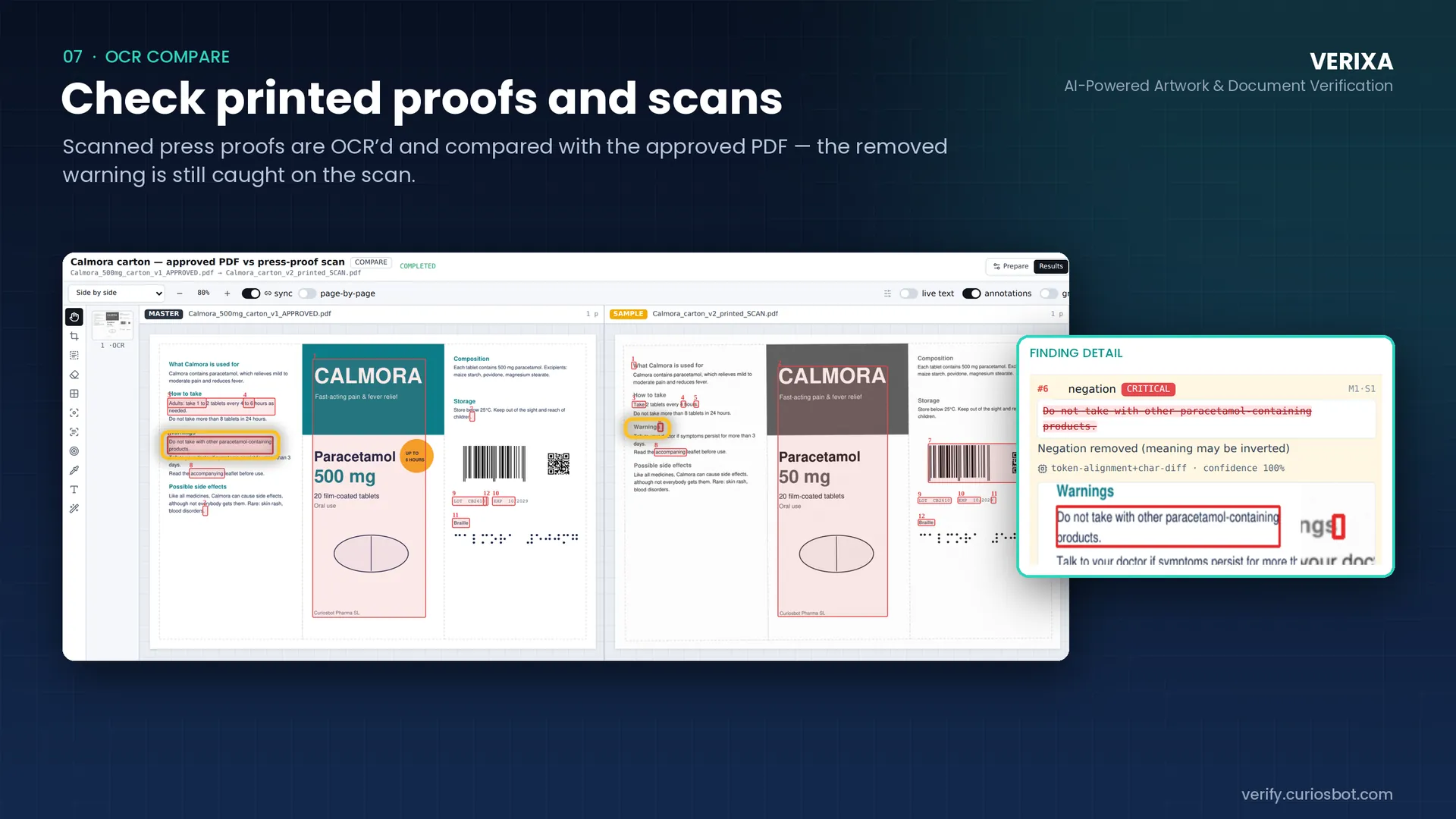
Verixa OCR compare: an approved PDF beside a scanned press proof, with a CRITICAL negation-removed finding on a warning. (opens the full-size screen in a new tab)

07 OCR compare

Check printed proofs and scans

Scanned press proofs are read with OCR and compared with the approved PDF. In the sample, a removed warning is still caught on the scan.

  • Compare an approved PDF with a scanned press proof
  • A removed negation is flagged CRITICAL because the meaning may be inverted
  • Findings link back to the exact spot on the scan
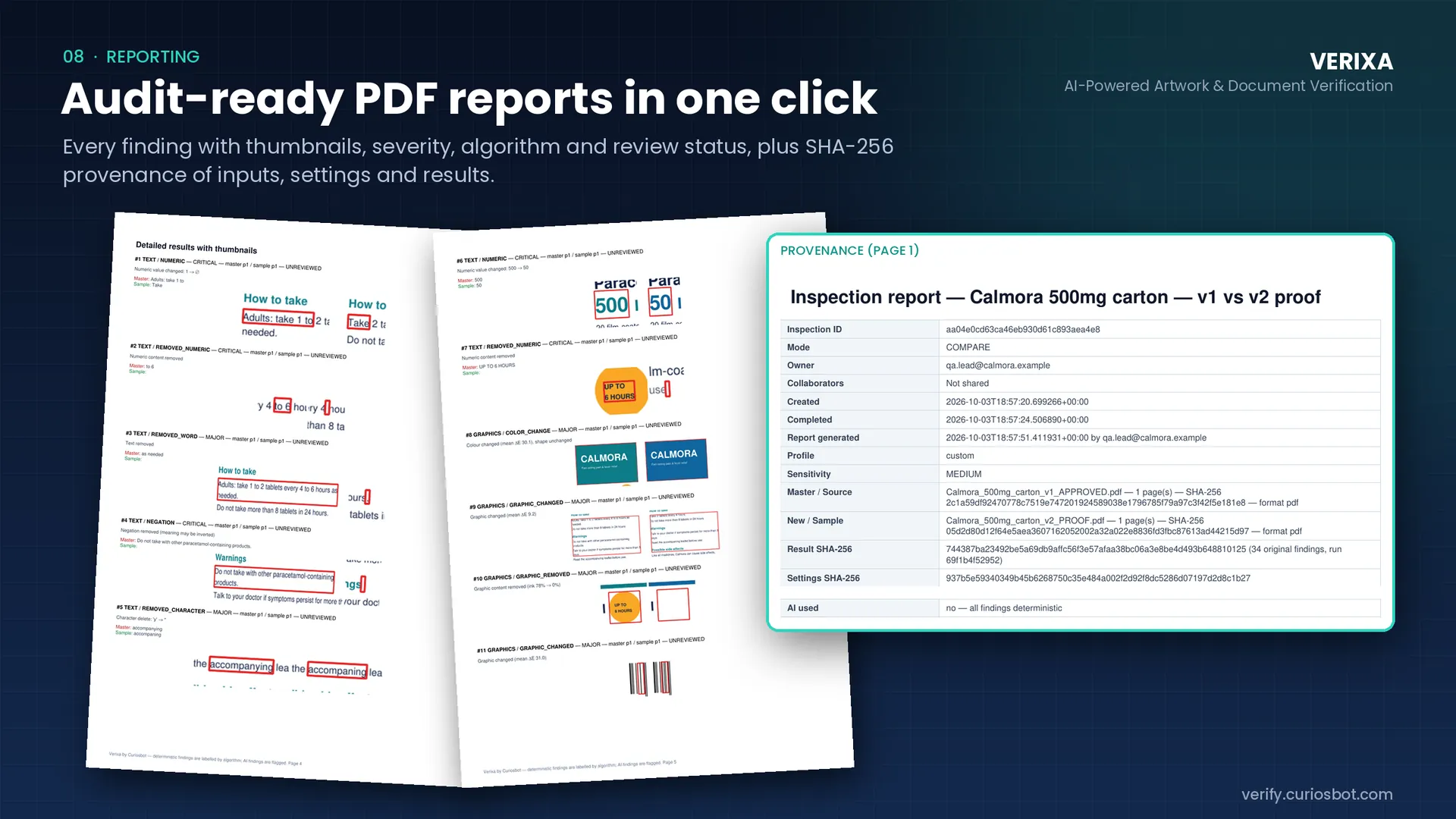
Verixa PDF report pages with finding thumbnails, next to the provenance table listing inspection ID, file SHA-256 hashes and “AI used: no”. (opens the full-size screen in a new tab)

08 Reporting

Audit-ready PDF reports in one click

Every finding is reported with a thumbnail, severity, algorithm and review status, plus SHA-256 provenance of the inputs, the settings and the results.

  • Inspection ID, owner, timestamps, mode and sensitivity recorded on every report
  • SHA-256 hashes for master, sample, settings and results
  • States whether AI was used: in the sample report, all findings are deterministic
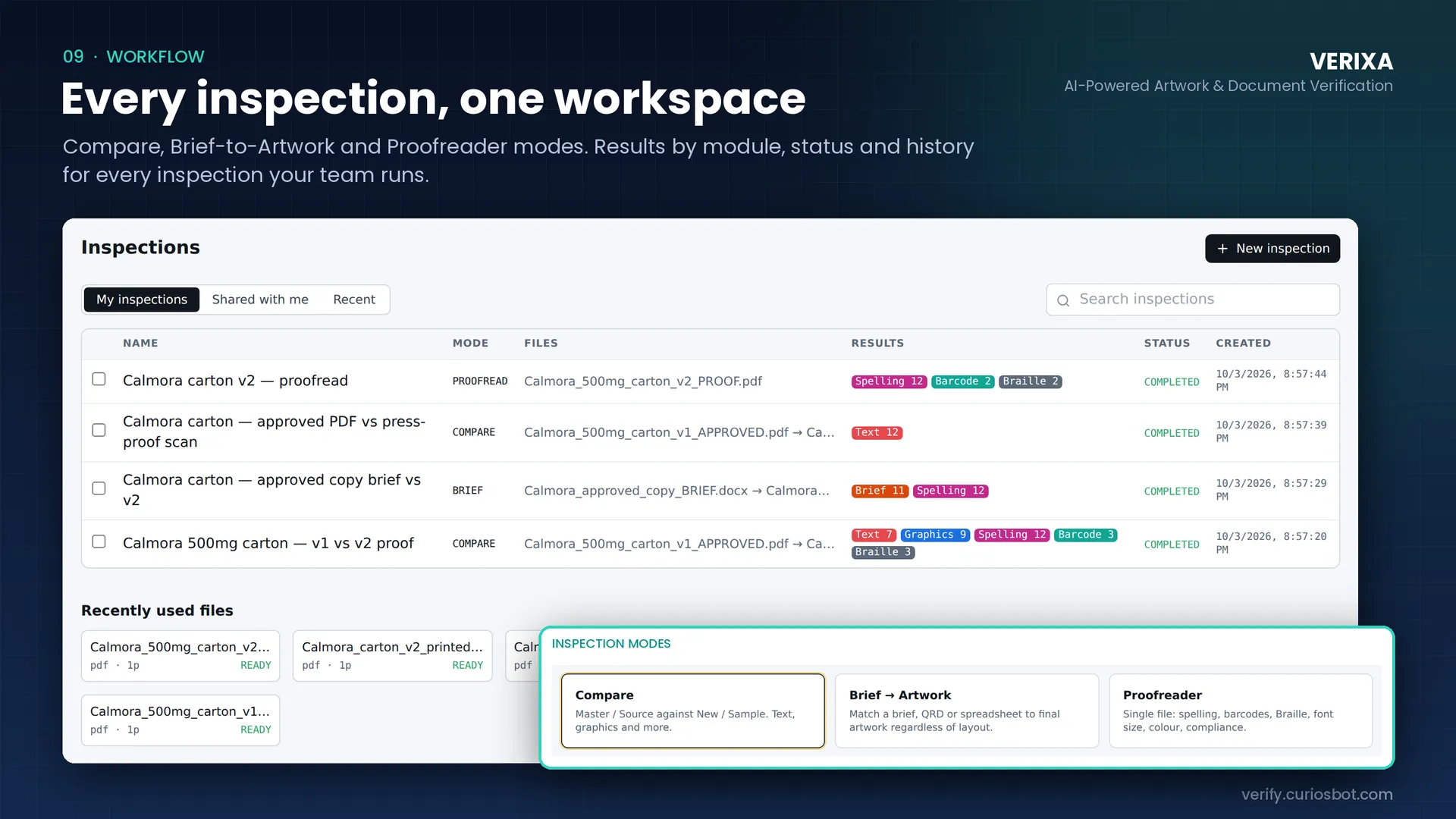
Verixa inspections list with module result chips, and the three inspection modes: Compare, Brief to Artwork and Proofreader. (opens the full-size screen in a new tab)

09 Workflow

Every inspection, one workspace

Three inspection modes cover the work: Compare, Brief to Artwork and Proofreader. Results are organised by module, status and history for every inspection your team runs.

  • My inspections, Shared with me and Recent views with search
  • Result chips per module: Text, Graphics, Spelling, Barcode, Braille and Brief
  • Recently used files ready to re-run
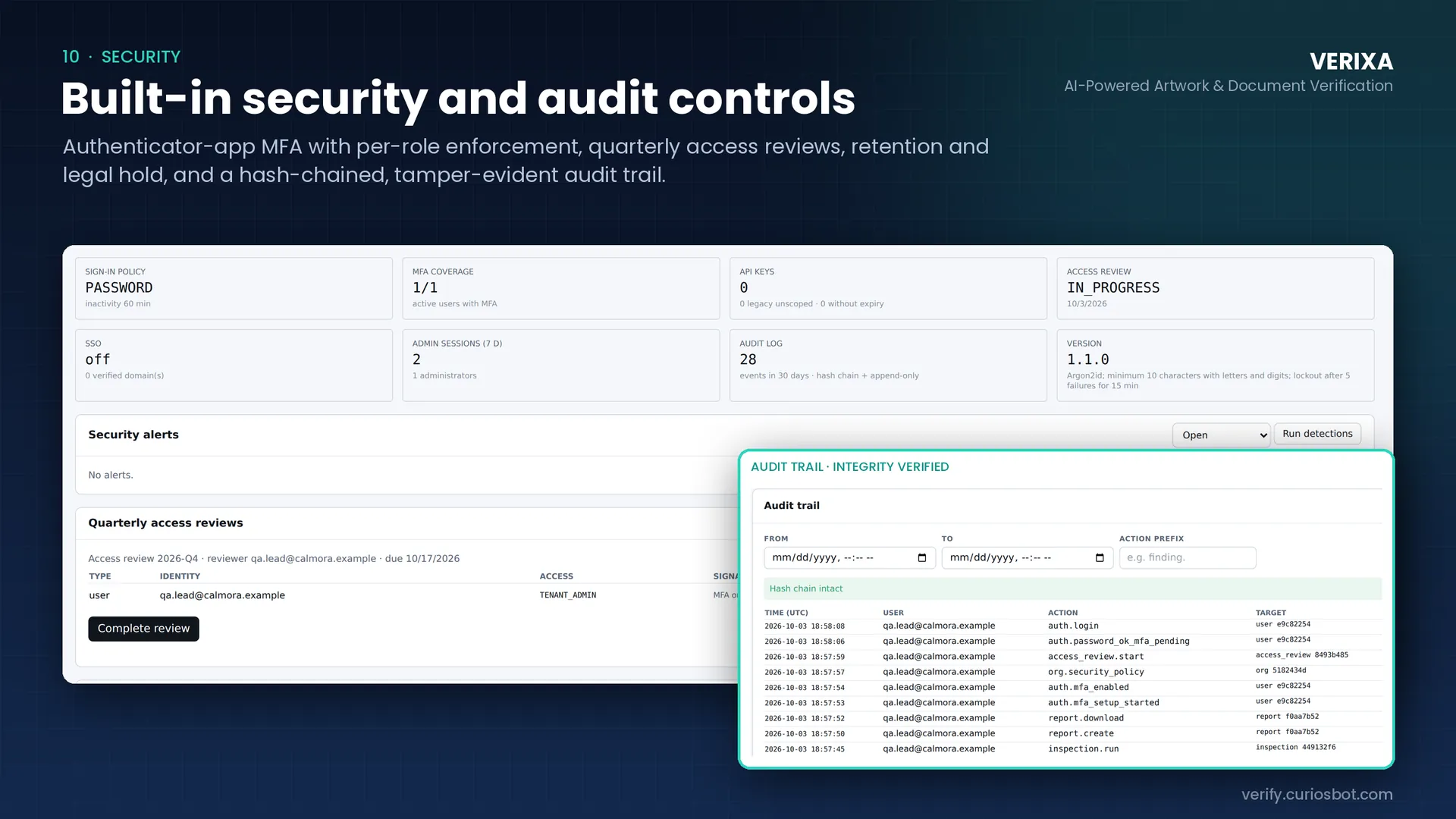
Verixa security dashboard with sign-in policy, MFA coverage, API keys, access review and audit log tiles, plus the audit trail marked “Hash chain intact”. (opens the full-size screen in a new tab)

10 Security

Built-in security and audit controls

Authenticator-app MFA with per-role enforcement, quarterly access reviews, retention and legal hold, and a hash-chained, tamper-evident audit trail.

  • Single sign-on with Microsoft Entra ID, Google Workspace or OIDC
  • Argon2id password hashing, minimum 10 characters, lockout after 5 failures for 15 minutes
  • Append-only audit log with a hash-chain integrity check; API keys tracked for scope and expiry

Inspection modes

Three ways to inspect, one set of findings.

Compare

Master or source against new or sample. Text, graphics, barcodes, Braille and spelling in one run.

Brief to Artwork

Match a Word brief, QRD or spreadsheet to the final artwork, regardless of layout.

Proofreader

A single file: spelling, barcodes, Braille, font size, colour and compliance checks.

  1. Upload

    Add the approved artwork and the new proof. Scans are read with OCR.

  2. Run

    Choose a mode and run the inspection. Results arrive in seconds.

  3. Review

    Approve, reject or comment on each finding, ordered by severity.

  4. Report

    Generate an audit-ready PDF with thumbnails and SHA-256 provenance.

Built for regulated work

Evidence you can defend, access you can govern.

Deterministic by default

Results are labelled by the algorithm that produced them. AI is opt-in, and reports state whether it was used.

Provenance you can prove

SHA-256 hashes of inputs, settings and results travel with every report.

Access you can govern

MFA with per-role enforcement, SSO, quarterly access reviews, retention and legal hold.

A tamper-evident trail

Every sign-in, inspection, report and policy change lands in a hash-chained, append-only audit log.

Made for

  • QA and regulatory affairs teams
  • Artwork and packaging managers
  • Brand and marketing operations
  • Prepress and print-quality teams

FAQ

Verixa: frequently asked questions

What is Verixa?

Verixa is an artwork and document verification web application from Curiosbot. It compares approved artwork with new proofs and inspects text, graphics, barcodes, QR codes, Braille and spelling, then produces an audit-ready PDF report.

What can Verixa compare?

Approved PDF artwork against new proofs, including scanned press proofs read with OCR, and Word briefs, QRD documents or spreadsheets against final artwork. A Proofreader mode checks a single file for spelling, barcodes, Braille, font size, colour and compliance.

Does Verixa use AI to decide what is different?

Findings are deterministic and labelled by the algorithm that produced them. AI is opt-in, and every report states whether AI was used.

Are the barcode quality grades certified?

No. Verixa measures indicative ISO/IEC 15416-style parameters on digital artwork. They are useful for catching problems early but are not a certified verification grade.

Does Verixa replace human review?

No. Verixa surfaces and ranks differences so reviewers spend their time on what matters. Each finding is approved, rejected or ignored by a person, and responsibility for release stays with your quality process.

How is access to Verixa secured?

Verixa supports authenticator-app MFA with per-role enforcement, single sign-on through Microsoft Entra ID, Google Workspace or OIDC, quarterly access reviews, retention and legal hold, and a hash-chained, tamper-evident audit trail.

Do the screenshots show real customer data?

No. All screens on this page use fictitious sample data: a made-up paracetamol carton and a made-up company.

How can I see Verixa on my own artwork?

Request a walkthrough and we will run it on your artwork with you. If you already have an account, sign in at verify.curiosbot.com.

See Verixa on your own artwork.

Send us an approved file and a new proof. We will walk you through the findings together.